scScript Intro 1
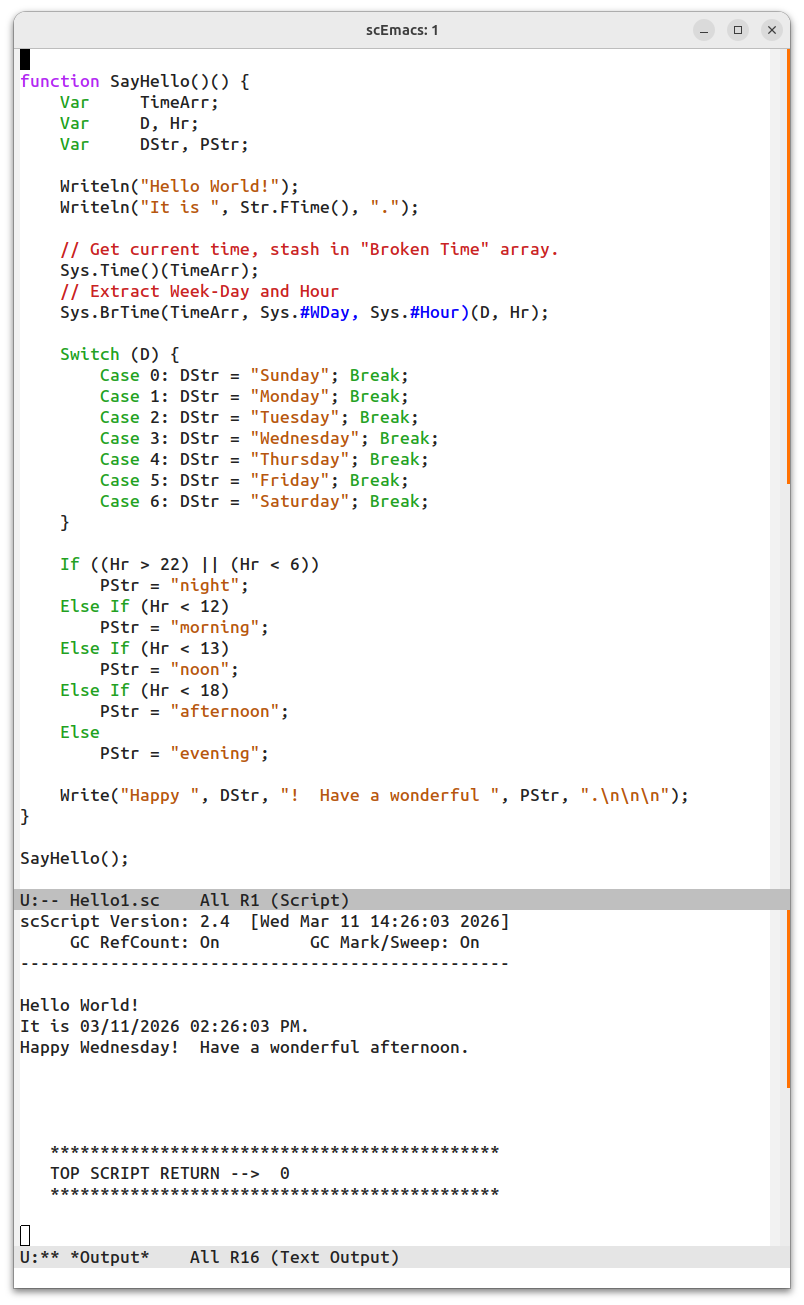
Hello1.sc is a sample script, slightly more than the
obligatory “Hello World!”. The image shows it run from scEmacs
using M-x script-do. The upper pane displays sources and the
bottom is *Output* when the Script is run.
Functions in scScript are defined with two param lists,
an in (Pass-by-value) list and an out (Pass-by-reference)
one. But a function can be called with just the in
list. SayHello defines a simple function with no in
or out parameters, but five local vars.
scScript, like most scripting languages, does not specify types
for its variables. Any variable can hold anything and the content itself
keeps track of what it is. So variables, whether local or global,
are simply declared as Var.
Sys is one of the main pre-defined packages in scScript.
As of this writing, the list of packages includes:
  Sc:    Language features
  Sys:   System calls
  Show:  Display routines
  Str:   String processing
  Ed:    scEmacs calls
  Pat:   Text matching
  Log:   Recording operation logs
  Math:  Math routines
Each package defines routines, such as Write and constants
such as #Day or #Hour. These are accessed via
the dot operator, which scScript also uses to specify keys
for dicts, just as C specifies fields in a record.
sc.Write is the main output function, it takes a list of
in args and writes them to the *Output* buffer (in
scEmacs) one after the other. But routines in the sc
package (and only that package) can be accessed directly without the
need for package and dot prefix, so sc.Write is usually
just coded as Write. A similar Writeln
(remember Pascal?) is also included, it just draws a newline character at the end. (There is
also a Sys.Print that works like printf in C
and takes all the same % directives!)
FTime in the Str package takes the current
(local) system time and makes a date-and-time string out of it (uses
Linux strftime). This then becomes an argument
to Writeln which draws the second line.
Sys.Time is a routine that normally just returns the
current time in secs since the Unix epoch began, exactly
as time does in Linux. But if given an out arg
(TimeArr in this case), Sys.Time will place
a broken time record in it. This value (the broken time) is
handed over to Sys.BrTime along with two pre-defined
flags. Sys.BrTime expects to have an arg in its out list
for each flag in its in list. It will extract the value indicated by
the flag and place it in the corresponding out var. So D will get the
#WDay (week day) value and Hr will get
the #Hour value from TimeArr.
The switch statement works just like C, and stashes the
selected DStr (Day Str). An if ladder stashes the
proper PStr (Period Str). Both vars make it to the
final Write and print out the last line of greeting.
In this example, Str.FTime and Sys.Time both
call the OS for their very own system time, but there can be a slight
discrepancy! So Str.FTime could get the time just before
midnight on Sunday while Sys.Time, called a few microns
later, may claim it is Monday. This can be remedied by
calling Sys.Time first, stashing the value it returns, and
passing it to Str.FTime as an in arg.
While the sample code above capitalized keywords (in green and purple), scScript is entirely case insensitive for language keywords and pre-defined system names. However, just like C, all user-defined function, variable, and constant names are case sensitive. This allows scScript keywords to adopt whatever case convention is preferred. (Finally an entire program in CamelCase, a dream!!)