
scScript Pattern GapRFunc
Another useful example (given in Pat4.sc of SampleSC), builds on
previous work to print out a C source file without its comments: (Lawyers sometimes ask for
this!!)
   PInStr  = Pat.Rep(0, 0, Pat.Alt(|>\"<|, Pat.Any()));
   PStr    = Pat.Seq(|>"<|, PInStr, |>"<|);

   PLCom   = Pat.Span("//", "\n");
   PBCom   = Pat.Span("/*", "*/");
   PCopy   = Pat.Alt(Pat.#Res, |>'"'<|, |>'\"'<|, PStr, PLCom, PBCom);

   Function DoCopy()()
   {
       Var Ord = Pat.GetOrd();          // 0 if GapRFunc

        If (Ord == 4)                   // PLCom
            Write("\n");
        Else If (Ord < 4)               // GapRFunc, charspecs, or PStr,
            Write(Pat.GetStr());        //   but NOT a comment!

       Return 1;
   }

   Pat.Match(BN, PCopy, Pat.#Skip, 0, 0, 0, DoCopy, DoCopy);
Pat.Match goes through the entire buffer, matching against PCopy.
Since PCopy is the only #Res Pat, the RFunc (DoCopy) will be called
each time it matches. DoCopy uses GetOrd() to determine which
component of Alt matched and what to write out. The char specs and PStr are
written out verbatim, text matching PLCom is reduced to just a <newline>
char, and PBCom strings are ignored completely.
The secret sauce comes from the second DoCopy in the Pat.Match
call. This DoCopy is the GapRFunc callback, it is called on text the matcher
gaps over on the way to a match. Here the GapRFunc DoCopy will
transcribe the unmatched lines of C code, not quotes, not char specs, nor comments. So the
unmatched text will be written out as GetOrd() (and also GetPat())
will return 0 when called from inside a GapRFunc.
The above operation will likely leave a great deal of whitespace. A good approach is to use another pass to remove excess whitespace. In general, multiple simple passes are easier to code, test, and run than a single complex one that tries to do too much.
The following is sample code to remove excess whitespace. It reads from OBN
(assuming a version of the above code uses Ed.Write to write to
an OBN buffer instead of Write to *Output*)
and Xfers the new version to the OOBN buffer.
// Discards the extra blank lines
Var PWS = Pat.Rep(1, 0, Pat.#Max , Pat .Char(Pat.#WSpace));
Var PBlank = Pat.Seq(Pat.#Res , PWS, "\n" );
// Catches the single blank line + any code.
Var PC = Pat.Rep(0, 0, Pat.#Max , Pat.Char(Pat.#Neg , "\n" ));
Var PCode = Pat.Seq(Pat.#Res , PC, "\n" );
Function CodeRFunc(Null , SPos, EPos, Null , Null , ThePat)()
{
If (ThePat == PBlank)
Ed.Write(OOBN, "\n" );
Else
Ed.Xfer(OOBN, OBN, SPos, EPos);
Return 1;
}
Pat.Match(OBN, Pat.Alt(PBlank, PCode), Pat.#Skip , 0, 0, 0, CodeRFunc);
It might seem appealing to use separate SFunc for PBlank and PCode
instead of the single RFunc; but that will not work!! The Reps in PWS
and PC are #Cons (by default) and #Max. So they will repeat until their
containing Seq is satisfied, at which point the Seq triggers off its SFunc. But the ever
greedy #Max Rep will then look at the next line... and the Seq will be satisfied again!
When it comes to #Max, only RFunc give the proper result. Here, this requirement spreads
from Rep to its Seq container because of #Cons.
There are two important notes in the above scenario: (the main code before the whitespace digression)
DoCopymust be an RFunc, it cannot be an SFunc forPCopy. SFunc are called in a tight sub-loop that matches individual patterns/strings while GapRFunc callbacks are called from the top-level Match loop. Therefore, SFunc are invoked before Match recognizes success and has a chance to invoke the GapRFunc for the preceding data. The problem here is not that SFunc would be obviated, but that it would be called before GapRFunc, thus scrambling the output.- The above example could be implemented, albeit inefficiently, with just an RFunc (and
no GapRFunc). But the final Alt would need one or two more entries. At a minimum the
Alt would need a final
Any()to match regular C code, that is not currently matched by other alternatives, or perhaps aPWordandPNotWordto serve the same purpose. Either way, GapRFunc in conjunction with a #SkipMatchwill be simpler and faster.
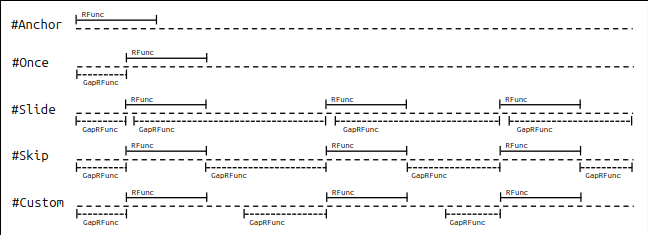
The GapRFunc is called on areas where Match scans the data
buffer before its Pat/Str arg bites and the RFunc is invoked. In the case of
#Anchor, nothing is ever scanned, so the GapRFunc is not called. Similarly, #Once
will call the GapRFunc only on data preceding the match. This could
be nothing if the Pat matches instantly or it could be the entire buffer if Pat does
not match at all! The remaining match modes will similarly call the GapRFunc only on gap
area, which in the case of #Slide may greatly overlap matched areas.
The script itself could replicate GapRFunc functionality by maintaining state variables in the RFunc, and perhaps calling it explicitly after the final Match. But the main purpose of a scripting language is to make life easier, so GapRFunc is provided as a convenience.
Another example looks for palindromes in a source file. While a highly unlikely
task, it will illustrate an important point. (And it did find many instances of pop
and level in scScript sources!)
   Function GetPal()()
   {
       Var S = Str.CCase(Pat.GetStr(), Str.#Low);
       Var L = Str.CLen(S);

       if ((L > 1) && (S == Sys.Reverse(S)))
           Write(S, " "), PalCount += 1;

       return 1;
   }
GetPal is an SFunc to verify if the matched word is a palindrome. If so, it
will Write it out and increment the global PalCount variable.
Note the use of Str.CCase to change the extracted string to lowercase. This is
important for the test stage, as "Baab" will not equal
(==) "baaB" when reversed.
Instead of the naive definition of a word, this example will use the proper C definition: a
group of alphanumeric characters starting with a letter or underscore! This excludes pure
numbers or words of the form 2MyVar etc.
The outline starts with PAlph and PWord:
   PAlph =  Pat.Char(Pat.#Alpha, "_");
   PWord =  Pat.Seq(Pat.Char(Pat.#Letter, "_"),
                    Pat.Rep(0, 0, Pat.#Self + Pat.#Max, PAlph),
                    Pat.#S_Func, GetPal);

   Pat.Match(BN, PWord, Pat.#Skip);
But this will be sub-optimal! Sooner or later, Match will come across a hex
number such as 0xACF2300B, scan over the leading 0, and consider
the rest a word!! While this will never be a palindrome, it is obviously the wrong thing to
do.
The solution is to expand the definition with an elimination pattern:
   PAlph =  Pat.Char(Pat.#Alpha, "_");
   PElim =  Pat.Rep(1, 0, Pat.#Self + Pat.#Max, PAlph, Pat.#S_Func, NotWord);
   PWord =  Pat.Seq(Pat.Char(Pat.#Letter, "_"),
                    Pat.Rep(0, 0, Pat.#Self + Pat.#Max, PAlph),
                    Pat.#S_Func, GetPal);
   PPalin = Pat.Alt(PWord, PElim);

   Pat.Match (BN, PPalin, Pat.#Skip);
Using an Alt with an explicit elimination pattern (PElim) will prevent the
Match scanner from partially eating a word-like alphanumeric
string. PElim will fully digest and eliminate anything that could cause such
confusion.
The final example (yes, final!!), while surprisingly simple, was actually used to
test scEmacs. A routine was needed to create Windows-style files,
with <CR><LF> terminating every line, from Linux-style files with
just <LF> line ends. Importantly, it should be smart enough not to add
redundant chars if the file already had <CR><LF> on some lines.
Var BN = Ed.ReadFile("./SampleSC/Sample_BigC.txt" , Ed.#Show );Var OutBN = Ed.GetBuf("./SampleSC/Sample_TestCR.txt" );// Output! Var LinePat = Pat.Seq(Pat.#Res ,"\n" , Pat.#Neg , Pat.Seq(Pat.Go(-2),"\r" ));Var LineCount = 0;Function GapRFunc(PDict, Start, End)() { Ed.Xfer(OutBN, BN, Start, End);Return 1; }Function RFunc()() { Ed.Write(OutBN,"\r\n" ); LineCount += 1;If (LineCount % 64 == 0) Write("." );Return 1; } Pat.Match(BN, LinePat, Pat.#Skip , 0, 0, 0, RFunc, GapRFunc);
The solution uses a one-line Pat along with 2 callback functions. The script reads the
input file into the BN buffer and creates a fresh output
buffer, OutBN, to receive the data. This is the normal mode for automated file
changes, reading and writing to the same buffer is usually and most emphatically a
recipe for disaster. Once the buffer is written, the user can view it and save the file
with scEmacs. Alternatively, the code could include the following, after the Pat.Match:
   Ed.ShowBuf(OutBN);
   Ed.SaveFile(OutBN);
Code in SampleSC/Pat4.sc DOES NOT save the buffer, if it did you would
have to delete the file each time you tried it!
In the above, the obviously named GapRFunc copies each scanned input line
verbatim to OutBN on the way to matching its EOL <LF>. The
RFunc then simply writes the <CR><LF> at the end of
each copied line. It also outputs a dot (to *Output*) for every 64 lines, to
show signs of life when processing large files. Note the use of Ed.Xfer
instead of the previously used Pat.GetStr (or similar) function. Building
strings takes a significant amount of memory management and processing,
but transferring bytes from one buffer to another can be quite rapid, especially if
the destination buffer is hidden and scEmacs does not have to do constant window
updates/scrolls.
<p>The transfer of data is instigated by a #Skip match of
LinePat;, which just looks for <LF> characters. But LinePat
only matches if there is not already a <CR> before the <LF>. This is detected
with a #Neg sub-Seq that jumps back 2 spots and looks for a <CR>. If this
sub-Seq fails, LinePat will happily match, the accumulated span that
was gapped over by Match will be copied to OutBN by
GapRFunc, and RFunc will add a <CR><LF> after it. This
will reset the Match, which will #Skip over and continue processing lines from the
very next position.
When the <LF> (or anything else) is matched, the core Match routine
moves to the next character of input, this will be +0 by definition. In the
case of LinePat, the immediately preceding character, the <LF> that just
matched, will be at Go(-1). So the character before that, where the <CR>
would be, uses a Go(-2).
An astute reader would ask "but what of the very beginning, suppose there is an <LF>
at position 0?" Interestingly, that just works! Go(-2) will
obviously fail as it cannot go before the beginning of the buffer.
But LinePat does not care why its #Neg sub-Seq fails, as long as it does.
Whether there is no <CR> or no Go(-2), the sub-Seq fails
and LinePat fires.
scEmacs cannot draw a <CR> as it has no visible glyph, nor a carriage to
return! Instead, it just denotes the <CR> (and any other missing glyphs) with a small
box. While scEmacs can write and save the OutBN buffer with all the <CR>
chars, it normally just filters them out when reading a file in for the first time.
It is an easy matter to delve even deeper into pattern matching. But the above (lengthy) exposition and the many examples have covered major points, hopefully forming a good base to explore from. For those wanting to get deeper into the implementation of the matcher, the section on debugging will introduce its low-level dynamics, and of course there is always the source code!!