

Running scScript
The current version of scScript is run and controlled exclusively from
scEmacs. The most common strategy is to open an .sc file
in scEmacs, usually with C-x C-f for Find
File. Once that .sc text file has been loaded into
the active pane, the command M-x script-do will compile and
run the whole script. The results will show up in
the *Output* buffer on scEmacs. (If *Output*
is not already visible, the main frame of scEmacs will split to show
that buffer in a lower pane.)
The very useful command M-x script-wipe-output serves to:
- Display the
*Output*buffer if not already visible and - Clear out the
*Output*buffer (only the buffer) of any previous contents.
Multiple (same or different) scripts can be run in sequence, with the
resulting output getting automatically appended to
the *Output* buffer, which can be wiped as desired. The
*Output* pane will automatically scroll to show the new
(appended) lines, but only if its cursor remains at the end of
the buffer. Naturally, the *Output* buffer can also be
written (C-x C-w) to a file and saved for later.
scScript can be compiled with a DEBUG flag
and #define macros that allow for a great deal of control on
the compiler output. For example, it can be set to show how the compiler
interprets every single line of the script and show bytecodes generated
for each. But adding and displaying *Output* is the slowest
thing scScript does, so this will drastically slow down the compile
process. Otherwise, compiling without the debug displays will be
instantaneous for most scripts.
Each time scScript executes, it leaves the global memory state
around. This includes all global variables and their stored values.
The M-x script-try command can then be used to compile and
run selected chunks (fractions) of a script using these values.
For example, after running a script with script-do, one can
select: (hi-lite within scEmacs)
Show.Globs()
and M-x script-try it to see a display of all global variables
and their values. In that sense, M-x script-try will
compile and run script chunks incrementally, in the memory state left
behind. The script chunk will also have access to scScript strings,
constants, and defs left by the previously run script. In
turn, it can declare/define new globals, change values, introduce new
strings, or define new constants and defs! So script-try
can be used to incrementally debug/develop an scScript without
having to run the whole thing repeatedly from the top.
A try chunk can change the value stored in a
global, but it cannot change any constants or strings. All it can do is
define additional constants and strings that it, or
subsequent try chunks, will use. Similarly, while it can
change a Def value, the previously compiled code already has
the old values incorporated. Any changes will only effect the compilation
of subsequent chunks. (Def are only for the compiler. Once
compiled bytecode use/reference Def values directly.)
The command M-x script-reset will expunge the memory state
left behind by a previous script run, creating a fresh start. But this is
seldom used, as every script-do (and many other script
commands) will first do an implicit reset.
(script-wipe-output does not script-reset and
vice versa.)
scScript also provides the M-x script-compile command to
compile the entire script (obviously in a fresh memory state) and write
out a .bsc object file. It will not run the script, but the
object file it generates can subsequently be loaded and run
using M-x script-run. The object file has everything tightly
packaged and pre-compiled, so loads very quickly.
Currently, script-try is quite limited after running
a .bsc file, as the object file does not store global
variable names! Without names, the subsequent script chunk cannot find
and access global variables and their values.
Importantly, script-run will prompt for a filename, so can
be called from any scEmacs pane. It can actually run
a .bsc object file or an .sc script. In the
latter case, script-run will compile, write
a .bsc file, then run the script.
scScript also allows a running script to load a sub-script into
a variable and execute it, albeit in a subordinate
capacity. Script.Load will accept a file/pathname string.
It will compile and load the .sc file or just load
the .bsc object code into memory, ready for execution. A
subsequent Script.Exec call will then execute the loaded
sub-script. In all cases, the sub-script runs in its own environment
and cannot directly alter memory in the parent script. (This was
initially implemented for validation & verification suites, but
may get expanded in the future.)
Common Errors
The most common user error in scScript is writing MyDict.K
instead of MyDict[K], where K is a variable.
Next is confusing in and out args, especially for
predefined functions, as in:
Sys.GetArgs(InA, InC, OutA, OutC);
instead of
Sys.GetArgs()(InA, InC, OutA, OutC);
When using coroutines, it is common to Yield without a
loop, thus inadvertently terminating a persistent function.
Pattern matching is quite complex and has its very own section on Common errors.
Performance
scScript, as it stands, has good runtime speed. It is of course possible to further optimize to excel at given benchmarks; but the system currently should be entirely fast enough for general use. On all but the very longest scripts, compile feels instantaneous and scScript rapidly blows through execution.
When compiled with the DEBUG flag, scScript will add very
many extra checks and redundancies to quickly catch any memory management
errors that might creep in during software development. Such errors, if
not caught immediately, will slowly corrupt memory and lead to entirely
unpredictable results that are all but impossible to trace.
The DEBUG options will necessarily add a great deal of
overhead and processing, so will drastically slow down the system (as if
running valgrind). The source code contains
many #define options and parameters to fine tune this
behavior.
With DEBUG and Compile Display, scScript will
show each line of source script as it is compiled and write out exactly
what ByteCodes are assembled. While not so useful for script writers,
this is of immense value to system development and debugging as well as a
great instructional tool. Naturally, this display will slow everything as
writing to *Output* and updating scEmacs is time
consuming.
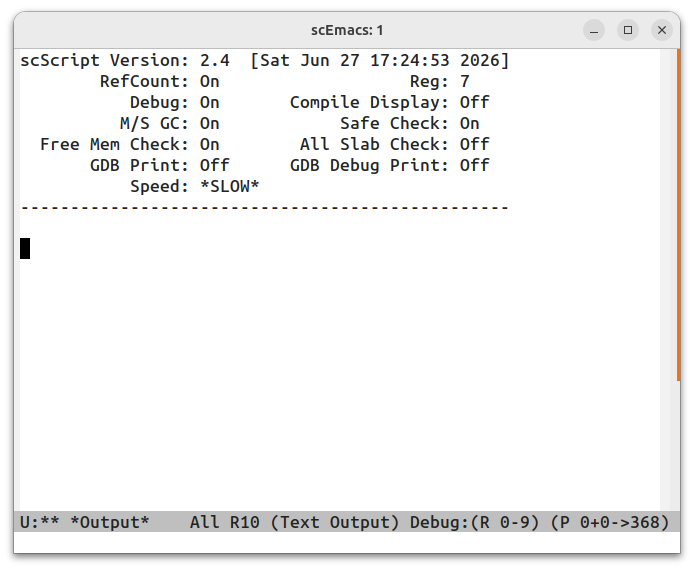
Importantly, the header message displayed at the top of
fresh *Output* buffers will list the current compile options,
and what performance speed to expect:
scScript source code also has flags to control garbage collection, both periodic Mark-Sweep GC as well as on-going RefCounting. In the case of the former, the initial memory and threshold step size for re-invoking GC are also defined. It is entirely possible to set GC parameters and debug tests to slow the system below acceptable levels, as in forcing frequent collection along with tests that scan entire memory slabs each time a single record is released!