

scEmacs Basics
The most important command is C-g (abort) which flushes any
mistyped or partial commands and exits any undesirable modes or situations. It works
similar to ^C on most systems.
To reverse out any edits, use C-/ (undo). If
one undo does not go back far enough, repeat!
There are many commands to kill text, they all place the text in
the killring for later retrieval. Use C‑y to yank the
killed contents (and paste them) at the current cursor location. For a previous kill, do a
C‑y first, then use one or more M‑y (yank-pop) to go
farther back in the killring. This unconventional method of cutting
and pasting goes back to the historic origins of RealEmacs!
Most commands accept a numeric argument to repeat their operation, many even reverse
direction if given a negative number. To enter a numeric count type C‑u
followed by the number (or type M-number instead of C-u number)
before entering the command. A C-u with no subsequent digits defaults
to a count of 4, therefore C‑u C‑f will move the cursor forward 4 places just
as C-u 4 C-f or M-4 C-f would.
C-space (set-mark) marks the cursor location. Subsequent
movements of the cursor will select and highlight text between the mark and the
cursor. Once selected, you can delete/kill the entire region with a single command!
In fact typing any character will replace the selected text with that single
letter. C‑g will exit the selection mode and remove the highlighting. There
are also commands to display previous marks and move the cursor to them, without selecting
anything.
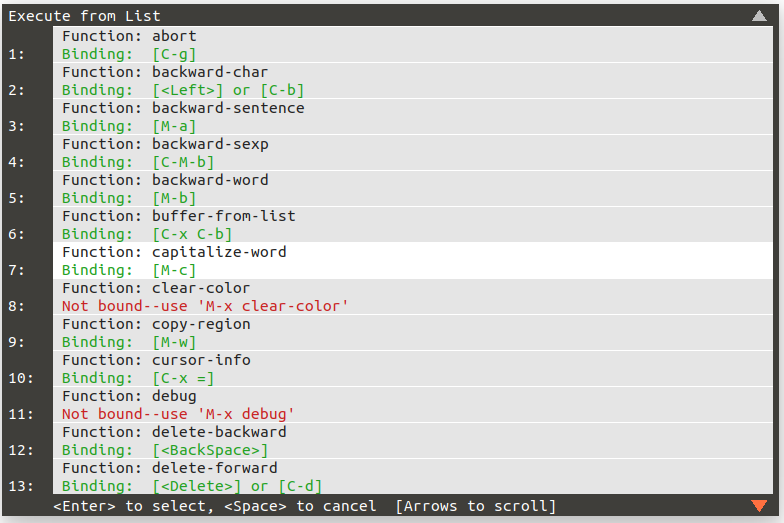
The command C-M-x (exec-from-list) will pop-up a menu/window
listing all available commands. It permits scrolling and selection (using the mouse or
Up/Down keys) of any command, which it will immediately execute. Hitting any key (even just
Control or Meta) will get rid of the pop-up. While technically a
selection menu, this is also a help mechanism, enumerating all commands and binding
in one place. This, and all similar pop-ups, can be dragged from their title area (like any
window) to re-position and will remember the new location.
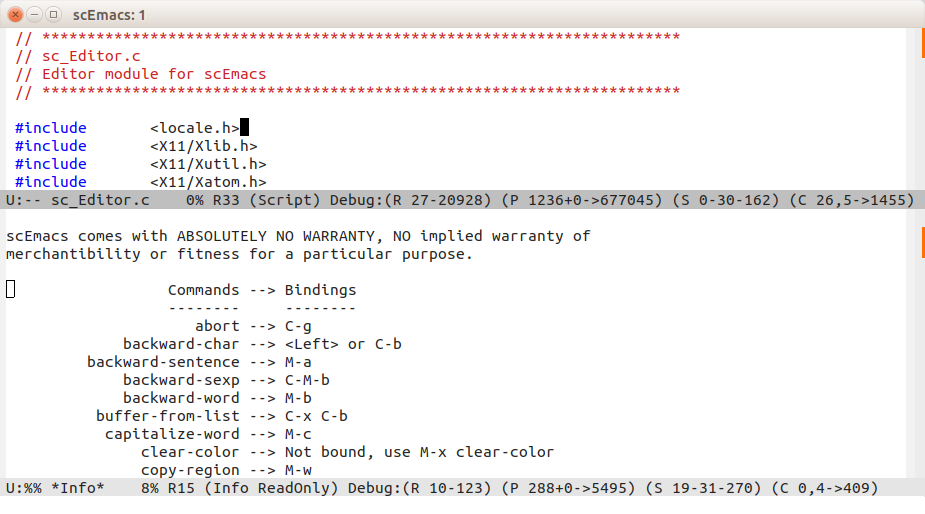
Finally, C-h (help) will split the frame to show a listing all
scEmacs commands in alphabetical order. C‑x o (other-pane) will
jump to the other pane and C-x 0 (kill-pane) will close it. Note
the mode line on the ReadOnly *Info* pane. This buffer cannot be modified, and
if killed, will be regenerated on the fly. But being a buffer, it can be written (C-x
C-w) to a file, at which point it stops being a readonly info buffer, so
subsequent calls for help will re-generate a new version!
The next and final section will have a tabular summary of all scEmacs commands.